Golf Simulators
Custom design and installation for year-round play in Central New York.
Central New York winters are long.
A professionally installed golf simulator means the season never really ends.
Golf simulators are a natural extension of what we've always done: designing spaces where technology disappears into the experience.
We entered this category in 2025 to meet growing demand, and we brought everything we know about custom installation with us. Every system is designed for the space, built around your game, and installed by a team that's been doing this in CNY homes for over 25 years.
The Enclosure
Tailored to the space
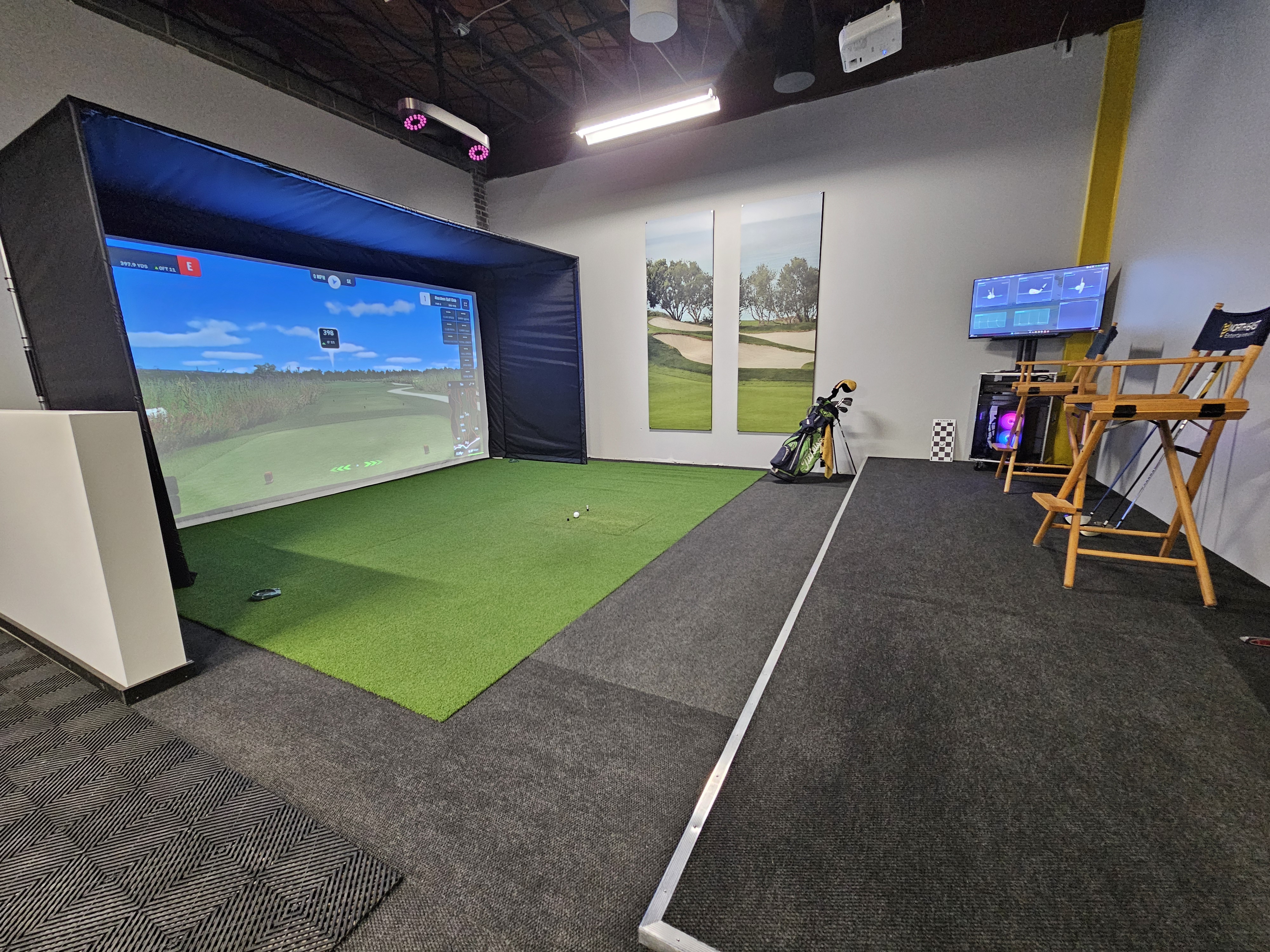
The enclosure defines the room. Frame dimensions, screen type, side panel configuration, and hitting surface are all specified for your ceiling height, room depth, and how the space will be used. There is no standard build. Every enclosure is sized and assembled for the room it goes into.
Enclosures are available in freestanding and built-in configurations. Built-in systems integrate directly into the room with padded walls, a finished aesthetic, and a cleaner overall look. Freestanding systems offer flexibility for spaces that may serve multiple purposes.
| Dimension | Minimum | Preferred |
|---|---|---|
| Ceiling height | 9 ft. | 10 ft. (required for overhead monitor configurations above the hitting zone) |
| Room depth | 15 ft. (screen to rear wall) | 18 to 20 ft. |
| Room width | 12 ft. for comfortable swing clearance on all club types | |
Tech
Impact screen tension, surface texture, and gain rating must be matched to the projector specification. Screen and projector are always specified together.
Partner Spotlight

Carl's Place is a reputable manufacturer of enclosures and screen systems designed for serious residential simulators. Their products are engineered for durability and optimized for projection performance.
Launch Monitor
The data behind every shot
The launch monitor is the sensor at the heart of the system. It reads ball and club data at impact and feeds that information to the simulation in real time. The accuracy of your simulator is the accuracy of your launch monitor.
We work across a range of launch monitor platforms, specified based on your room configuration, budget, and how you intend to use the system. Two primary configurations:
| Configuration | Placement | Best for | Ceiling requirement |
|---|---|---|---|
| Floor-standing | On the ground near the hitting zone, typically forward-facing | Lower ceilings, multi-use rooms, flexible placement | None |
| Ceiling-mounted | Above the hitting zone, tracking from overhead | Dedicated simulator rooms with a clean, floor-clear setup | 10 ft. clearance above the hitting zone |
Ceiling-mounted examples include Uneekor EYE XO and ProTee VX.
Tech
| Ball data | Ball speed, launch angle, spin rate, spin axis |
|---|---|
| Club data | Club path, face angle |
| Processing | Real-time data passed directly to simulation software |
| Calibration notes | Ceiling-mounted units require 10 ft. clearance above the hitting zone. Floor-standing units require calibration to room lighting and hitting position for consistent accuracy. |
We have access to a broad range of launch monitor options. If you have a platform in mind or want to understand what's available at your budget, that's exactly the kind of conversation we're here for.
Projection
Right-sized for the room
Projector selection is determined by the room. Throw distance, lumens, resolution are all matched to the enclosure dimensions and screen specification. Short-throw for tighter spaces, standard-throw when room depth allows for a larger, brighter image.
Tech
| Specification | Target |
|---|---|
| Brightness | 3,000 lumens minimum for a clear image on an impact screen |
| Input lag | Under 30ms for responsive simulation |
| Resolution | 1080p native or higher |
| Screen pairing | Projector and screen gain are always specified together |
The PC
Built for the software, not the shelf
Every simulator PC is custom built by our team, configured for the simulation software and sized to the projector's output resolution. GPU, CPU, and RAM are selected for the specific demands of real-time course rendering and simultaneous launch monitor data processing. Assembled, configured, and tested before it arrives in your room.
Tech
Simulation software requires a dedicated GPU capable of rendering course environments at 60fps at native projector resolution. Each build is tested with the full system, including launch monitor integration, before installation.
Simulation Software
Your choice of platform
We support multiple simulation software platforms and will help you choose based on your priorities: course library, shot data visualization, multiplayer options, or all of the above.
| Platform | Highlights |
|---|---|
| GSPro | Widely regarded as the leading independent simulation platform. Large course library, active development community, deep launch monitor compatibility. |
| E6 Connect by TruGolf | Polished interface, extensive course library, strong multiplayer and online tournament support. |
| Awesome Golf | Visually striking simulation with a growing course library and intuitive interface. |
| Creative Golf 3D | European-developed platform with a wide range of courses and practice modes. |
Add-ons and companion platforms including FlightScope, ProTee Play, and Simulator Golf Tour (SGT) are available to extend your system's capabilities.
Tech
All supported platforms communicate with the launch monitor via USB or network, receiving shot data in real time. Software is installed, configured, and tested on the custom PC before delivery. Updates and software support are included in the initial setup.
One Relationship
Enclosure, launch monitor, projection, PC, software, audio. Designed together, installed by our team, calibrated as a complete system. A simulator brings all of it together in one room.
The reaction when someone hits their first shot and watches the ball land on the fairway is exactly why we do this.
Ready to build your simulator?
Start the conversation